Showing posts with label test. Show all posts

Friday, 25 February 2011

Prototypes: Set up #4 - Full Size

The Art of Ping Pong Prototype #4 - Full Size from Jono Sandilands on Vimeo.

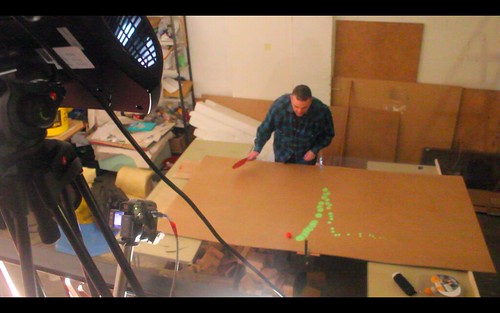
Using the same rough sketches as the last prototype (see here). The application uses colour tracking to track the red ball.

I set up a makeshift table using really thin sheets of board - they kinda absorbed the bounce making it really hard to play normally - will need to get a better surface even to test on - even an old ping pong table would be great - if anyone can help?

So hopefully in the video you can see how the projector and camera are placed at a high angle to the table - this test has confirmed that the projector and camera (especially) need to be directly above (or below if I can source a reasonably priced short throw projector - see table plan option 1 here).

Next:
A lot of work needed on the application
More tests of actual gameplay at full speed - I think the camera I currently use may not pick up high speed play.
Also work on plans for construction of the final table.

One step further...

Prototypes: Set up #4 - Full Size


Quick screen grab from video clip of full size working set up. Video coming soon.

Tuesday, 22 February 2011

Prototypes: Set up #3 - Colour Tracking

The Art of Ping Pong Prototype #3 from Jono Sandilands on Vimeo.

After a bit of getting back to basics in Processing over the past few days - here is another test/rough sketch but this time using colour tracking using a camera above, specifically of a red ping pong ball.

Basically the red ball acts like a pen and draws it's path onto the screen. There are two versions in the video - one which just builds up ellipses and one in which the ellipses become smaller with each update. (Screenshot below)

Be quite good to get this tested on a bigger scale - with actual gameplay. I will use projector from high angle with keystone and create makeshift table with camera directly above.

I can maybe even start thinking about more dynamic graphics and importing vectors. Other thing to think about with this is - people wearing clothing the same colour to the ball - also scope for using a collision sensor or microphone in the table to only record when the ball actually hits the table. - When doing these tests I placed my hand on my test piece of perspex - and could feel the vibration when the ball hits the surface - may not work on larger surface but be worth a test... soon time to get Arduino out.

Sunday, 9 May 2010

Prototypes: Set up #1 - Sound Test

The Art of Ping Pong Prototype #1 from Jono Sandilands on Vimeo.
Just now I am working how best to do this project, and had this idea to use sound to react to the sound the ball makes when it hits the table.

Shown in the video is a normal computer screen covered by a piece of perspex, using the internal microphone on the MacBook running Modul8 to change and show a random colour every time the microphone picks up a sound. Obviously this will happen with every sound but it could be possible to set up a microphone to pick up sound in only a specific place or frequency.

This is a very simple set up, and I would like to start developing this and also looking into slightly more dynamic set ups using sensors. Long way to go yet, but keep track of my progress on the blog. Thanks for looking!